> ## Documentation Index
> Fetch the complete documentation index at: https://docs.vast.ai/llms.txt
> Use this file to discover all available pages before exploring further.
# Architecture
> Understand the architecture of Vast.ai Serverless, including the Serverless System, GPU Instances, and User (Client Application). Learn how the system works, how to use the routing process, and how to create Worker Groups.
The Vast.ai Serverless solution manages groups of GPU instances to efficiently serve applications, automatically scaling up or down based on load metrics defined by the Vast PyWorker. It streamlines instance management, performance measurement, and error handling.
## Endpoints and Worker Groups
The Serverless system needs to be configured at two levels:
* **Endpoints:** The highest level clustering of instances for the Serverless system, consisting of a named endpoint string, a collection of Worker groups, and hyperparameters.
* **Worker Groups**: A lower level organization that lives within an Endpoint. It consists of a [template](/documentation/instances/templates) (with extra filters for search), a set of GPU instances (workers) created from that template, and hyperparameters. Multiple Worker Groups can exist within an Endpoint.
Having two-level scaling provides several benefits:
1. **Comparing Performance Metrics Across Hardware**: Suppose you want to run the same templates on different hardware to compare performance metrics. You can create several groups, each configured to run on specific hardware. By leaving this setup running for a period of time, you can review the metrics and select
the most suitable hardware for your users' needs.
2. **Smooth Rollout of a New Model**: If you're using TGI to handle LLM inference with LLama3 and want to transition to LLama4, you can do so gradually. For a smooth rollout where only 10% of user requests are handled by LLama4, you can create a new Worker Group under the existing Endpoint. Let it run for a while,
review the metrics, and then fully switch to LLama4 when ready.
3. **Handling Diverse Workloads with Multiple Models**: You can create an Endpoint to manage LLM inference using TGI. Within this group, you can set up multiple
Worker Groups, each using a different LLM to serve requests. This approach is beneficial when you need a few resource-intensive models to handle most requests, while smaller, more cost-effective models manage overflow during workload spikes.
It's important to note that having multiple Worker Groups within a single Endpoint is not always necessary. For most users, a single Worker Group within an Endpoint provides an optimal setup.
You can create Worker Groups using our [Serverless-Compatible Templates](/documentation/serverless/text-generation-inference-tgi), which are customized versions of popular templates on Vast, designed to be used on the serverless system.
## System Architecture
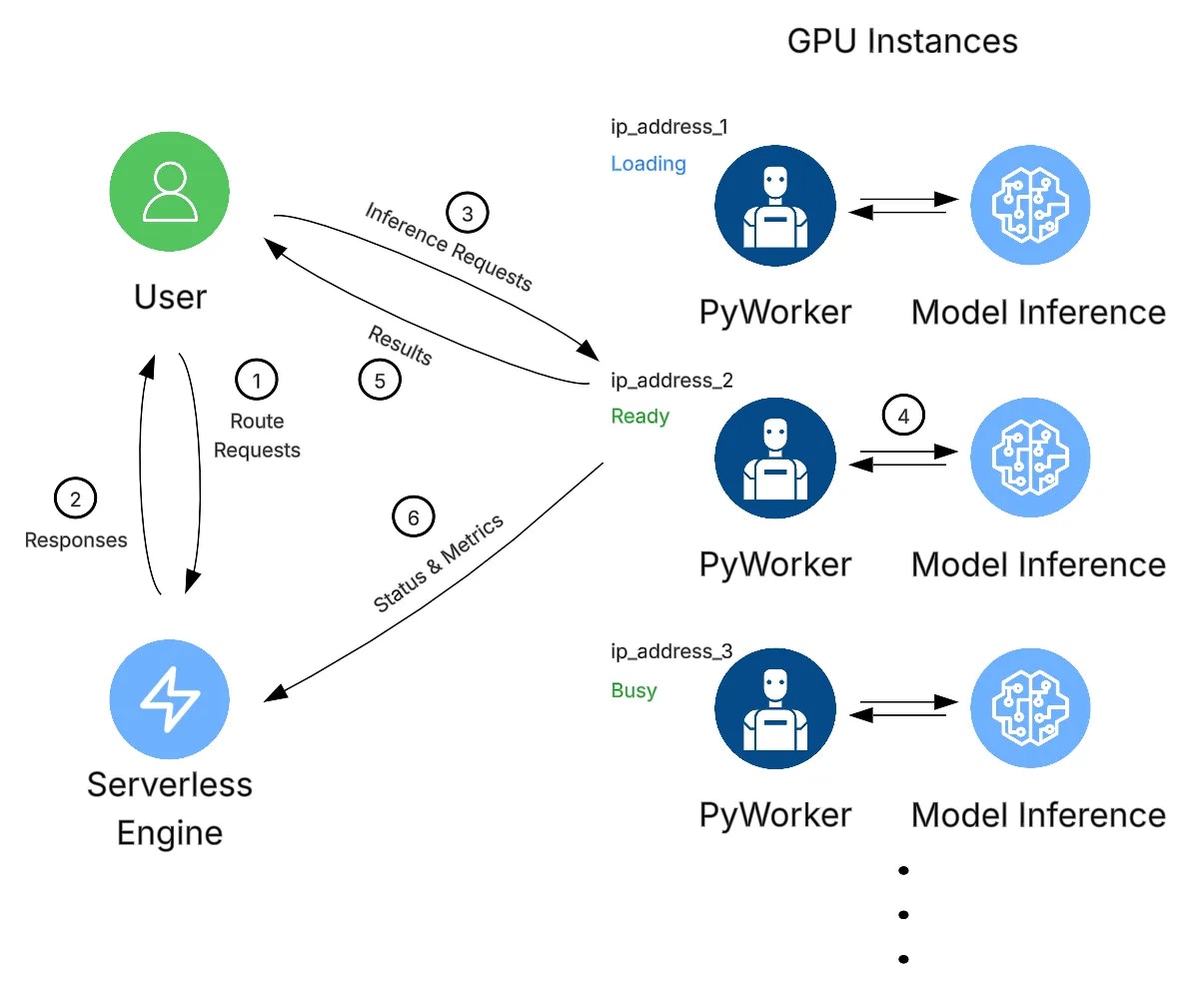
The system architecture for an application using Vast.ai Serverless includes the following components:
* **Serverless System**
* **GPU Instances**
* **User (Client Application)**
 ### Example Workflow
1. A client initiates a request to the Serverless system by invoking the `https://run.vast.ai/route/` endpoint.
2. The Serverless system returns a suitable worker address. In the example above, this would be `ip_address_2` since that GPU instance is 'Ready'.
3. The client calls the GPU instance's specific API endpoint, passing the authentication info returned by `/route/` along with payload parameters.
4. The PyWorker on the GPU instance receives the payload and forwards it to the ML model. After model inference, the PyWorker receives the results.
5. The PyWorker sends the model results back to the client.
6. Independently and concurrently, each PyWorker in the Endpoint sends its operational metrics to the Serverless system, which it uses to make scaling decisions.
### Two-Step Routing Process
This 2-step routing process is used for security and flexibility. By having the client send payloads directly to the GPU instances, your payload information is never stored on Vast servers.
The `/route/` endpoint signs its messages with a public key available at `https://run.vast.ai/pubkey/`, allowing the GPU worker to validate requests and prevent unauthorized usage.
### Example Workflow
1. A client initiates a request to the Serverless system by invoking the `https://run.vast.ai/route/` endpoint.
2. The Serverless system returns a suitable worker address. In the example above, this would be `ip_address_2` since that GPU instance is 'Ready'.
3. The client calls the GPU instance's specific API endpoint, passing the authentication info returned by `/route/` along with payload parameters.
4. The PyWorker on the GPU instance receives the payload and forwards it to the ML model. After model inference, the PyWorker receives the results.
5. The PyWorker sends the model results back to the client.
6. Independently and concurrently, each PyWorker in the Endpoint sends its operational metrics to the Serverless system, which it uses to make scaling decisions.
### Two-Step Routing Process
This 2-step routing process is used for security and flexibility. By having the client send payloads directly to the GPU instances, your payload information is never stored on Vast servers.
The `/route/` endpoint signs its messages with a public key available at `https://run.vast.ai/pubkey/`, allowing the GPU worker to validate requests and prevent unauthorized usage.