> ## Documentation Index
> Fetch the complete documentation index at: https://docs.vast.ai/llms.txt
> Use this file to discover all available pages before exploring further.
# PyWorker Overview
> Learn about Vast.ai's Serverless system - the Vast PyWorker, integration with model instances, and creating custom backends.
The Vast PyWorker is a Python web server designed to run alongside a machine learning model instance, providing serverless compatibility. It serves as the primary entry point for API requests, forwarding them to the model's API hosted on the same instance. Additionally, it monitors performance metrics and estimates current workload, reporting these metrics to the serverless system.
All of Vast's serverless templates use the Vast PyWorker. If you are using a recommended serverless template from Vast, the PyWorker is *already* integrated with the template and will automatically startup when a Worker Group is created.
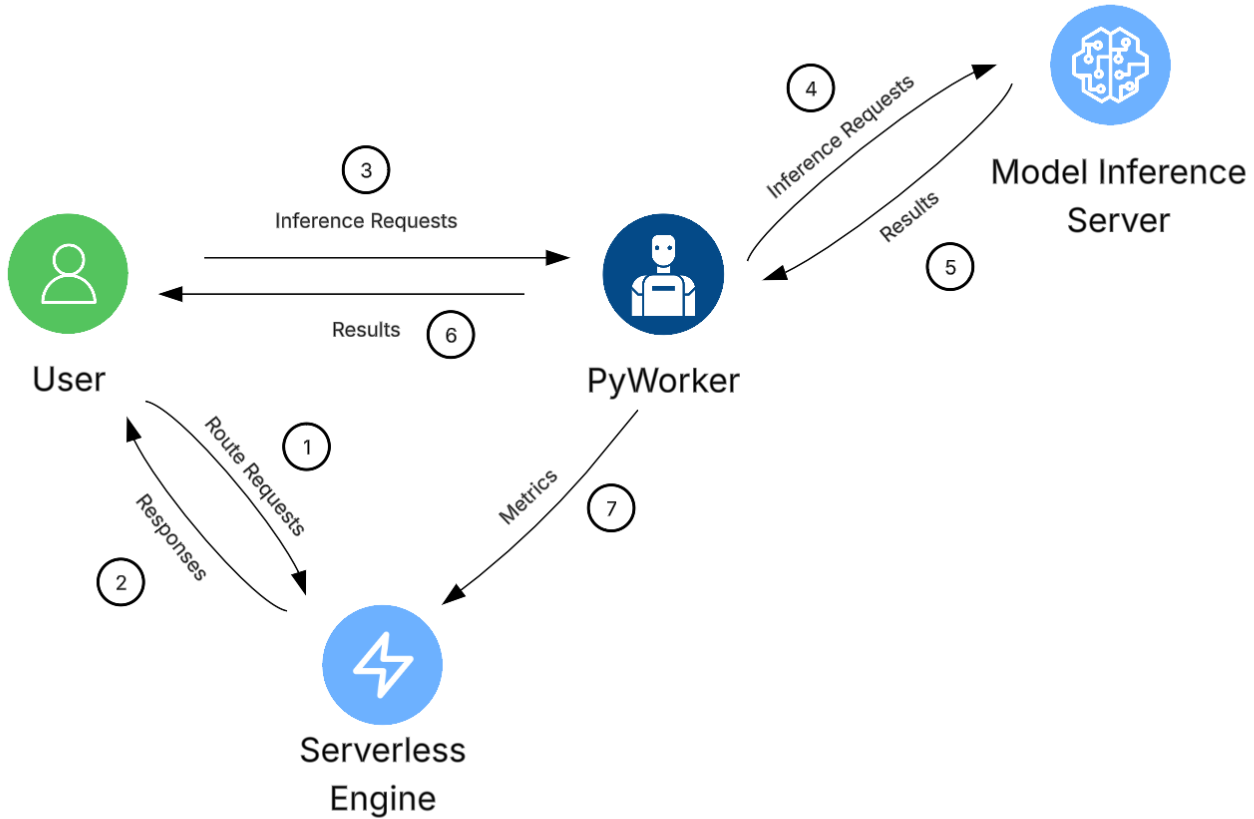 In the diagram's example, a user's client is attempting to infer from a machine learning model. With Vast's Serverless setup, the client:
1. Sends a [`/route/`](/documentation/serverless/route) POST request to the serverless system. This asks the system for a GPU instance to send the inference request.
2. The serverless system selects a ready and available worker instance from the user's endpoint and replies with a JSON object containing the URL of the selected instance.
3. The client then constructs a new POST request with it's payload, authentication data, and the URL of the worker instance. This is sent to the worker.
4. The PyWorker running on that specific instance validates the request and extracts the payload. It then sends the payload to the model inference server, which runs on the same instance as the PyWorker.
5. The model generates it's output and returns the result to the PyWorker.
6. The PyWorker formats the model's response as needed, and sends the response back to the client.
7. Independently and concurrently, the PyWorker periodically sends it's operational metrics to the serverless system, which is used to make scaling decisions.
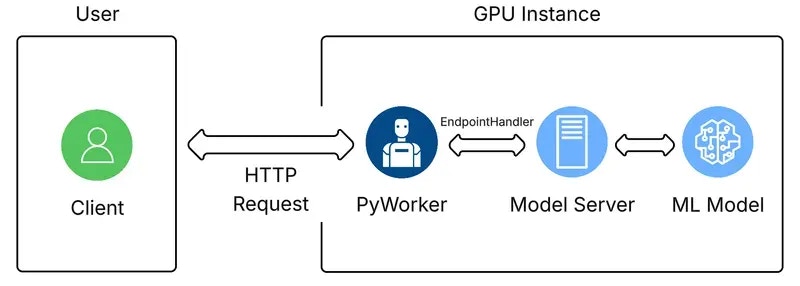
The [Vast PyWorker repository](https://github.com/vast-ai/pyworker/) gives examples that are useful for learning how to create a custom PyWorker for your custom template and integrate with Vast’s Serverless system. Even with a custom PyWorker, the PyWorker code runs on your Vast instance, and we automate its installation and activation during instance creation. The graphic below shows how the files and entities for the Serverless system are organized.
In the diagram's example, a user's client is attempting to infer from a machine learning model. With Vast's Serverless setup, the client:
1. Sends a [`/route/`](/documentation/serverless/route) POST request to the serverless system. This asks the system for a GPU instance to send the inference request.
2. The serverless system selects a ready and available worker instance from the user's endpoint and replies with a JSON object containing the URL of the selected instance.
3. The client then constructs a new POST request with it's payload, authentication data, and the URL of the worker instance. This is sent to the worker.
4. The PyWorker running on that specific instance validates the request and extracts the payload. It then sends the payload to the model inference server, which runs on the same instance as the PyWorker.
5. The model generates it's output and returns the result to the PyWorker.
6. The PyWorker formats the model's response as needed, and sends the response back to the client.
7. Independently and concurrently, the PyWorker periodically sends it's operational metrics to the serverless system, which is used to make scaling decisions.
The [Vast PyWorker repository](https://github.com/vast-ai/pyworker/) gives examples that are useful for learning how to create a custom PyWorker for your custom template and integrate with Vast’s Serverless system. Even with a custom PyWorker, the PyWorker code runs on your Vast instance, and we automate its installation and activation during instance creation. The graphic below shows how the files and entities for the Serverless system are organized.
 ## Integration with Model Instance
The Vast PyWorker wraps the backend code of the model instance you are running. The PyWorker calls the appropriate backend function when the PyWorker's corresponding API endpoint is invoked. For example, if you are running a text generation inference (TGI) server, your PyWorker might receive the following JSON body from a `/generate` endpoint:
```json JSON icon="js" theme={null}
{
"auth_data": {
"signature": "a_base64_encoded_signature_string_from_route_endpoint",
"cost": 256,
"endpoint": "Your-TGI-Endpoint-Name",
"reqnum": 1234567890,
"url": "http://worker-ip-address:port",
"request_idx": 10203040
},
"payload": {
"inputs": "What is the answer to the universe?",
"parameters": {
"max_new_tokens": 256,
"temperature": 0.7,
"top_p": 0.9,
"do_sample": true
}
}
}
```
When it receives this request, your PyWorker will internally send the following to the TGI model sever:
```json JSON icon="js" theme={null}
{
"inputs": "What is the answer to the universe?",
"parameters": {
"max_new_tokens": 256,
"temperature": 0.7,
"top_p": 0.9,
"do_sample": true
}
}
```
Your PyWorker would similarily receive the output result from the TGI server, and forward a formatted version to the client.
## Communication with Serverless
If you are building a custom PyWorker for your own use case, to be able to integrate with Vast's serverless system, each backend must:
* Send a message to the serverless system when the backend server is ready (e.g., after model installation).
* Periodically send performance metrics to the serverless system to optimize usage and performance.
* Periodically send completed request indices to the serverless system to track request lifetimes.
* Report any errors to the serverless system.
For example implementations, reference the [Vast PyWorker repository](https://github.com/vast-ai/pyworker/) or the examples in the [Vast Python SDK](https://github.com/vast-ai/vast-sdk)
## Creating a Custom Backend
If you want to create your own backend and learn how to integrate with the serverless system, please refer to the following guides:
* [Creating New PyWorkers](/documentation/serverless/creating-new-pyworkers)
## Vast Supported Backends
Vast has pre-made templates for popular models such as [Text-Generation-Inference](/documentation/serverless/text-generation-inference-tgi)
and [Comfy UI](/documentation/serverless/comfy-ui). These templates allow you to use these models in API mode, automatically handling performance and error tracking, making them compatible with Vast Serverless with no additional code required.
To get started with Vast-supported backends, see the [Inside a Severless GPU](/documentation/serverless/inside-a-serverless-gpu) guide.
## Integration with Model Instance
The Vast PyWorker wraps the backend code of the model instance you are running. The PyWorker calls the appropriate backend function when the PyWorker's corresponding API endpoint is invoked. For example, if you are running a text generation inference (TGI) server, your PyWorker might receive the following JSON body from a `/generate` endpoint:
```json JSON icon="js" theme={null}
{
"auth_data": {
"signature": "a_base64_encoded_signature_string_from_route_endpoint",
"cost": 256,
"endpoint": "Your-TGI-Endpoint-Name",
"reqnum": 1234567890,
"url": "http://worker-ip-address:port",
"request_idx": 10203040
},
"payload": {
"inputs": "What is the answer to the universe?",
"parameters": {
"max_new_tokens": 256,
"temperature": 0.7,
"top_p": 0.9,
"do_sample": true
}
}
}
```
When it receives this request, your PyWorker will internally send the following to the TGI model sever:
```json JSON icon="js" theme={null}
{
"inputs": "What is the answer to the universe?",
"parameters": {
"max_new_tokens": 256,
"temperature": 0.7,
"top_p": 0.9,
"do_sample": true
}
}
```
Your PyWorker would similarily receive the output result from the TGI server, and forward a formatted version to the client.
## Communication with Serverless
If you are building a custom PyWorker for your own use case, to be able to integrate with Vast's serverless system, each backend must:
* Send a message to the serverless system when the backend server is ready (e.g., after model installation).
* Periodically send performance metrics to the serverless system to optimize usage and performance.
* Periodically send completed request indices to the serverless system to track request lifetimes.
* Report any errors to the serverless system.
For example implementations, reference the [Vast PyWorker repository](https://github.com/vast-ai/pyworker/) or the examples in the [Vast Python SDK](https://github.com/vast-ai/vast-sdk)
## Creating a Custom Backend
If you want to create your own backend and learn how to integrate with the serverless system, please refer to the following guides:
* [Creating New PyWorkers](/documentation/serverless/creating-new-pyworkers)
## Vast Supported Backends
Vast has pre-made templates for popular models such as [Text-Generation-Inference](/documentation/serverless/text-generation-inference-tgi)
and [Comfy UI](/documentation/serverless/comfy-ui). These templates allow you to use these models in API mode, automatically handling performance and error tracking, making them compatible with Vast Serverless with no additional code required.
To get started with Vast-supported backends, see the [Inside a Severless GPU](/documentation/serverless/inside-a-serverless-gpu) guide.