> ## Documentation Index
> Fetch the complete documentation index at: https://docs.vast.ai/llms.txt
> Use this file to discover all available pages before exploring further.
# Inside a Serverless GPU
> Learn about the components of a Serverless GPU instance - the core ML model, model server code, and PyWorker server code.
All GPU instances on Vast Serverless contain three parts:
1. The core ML model.
2. The model server code that handles requests and inferences the ML model.
3. The [PyWorker](/documentation/serverless/overview) server code that wraps the ML model, which formats incoming HTTP requests into a compatible format for the model server.
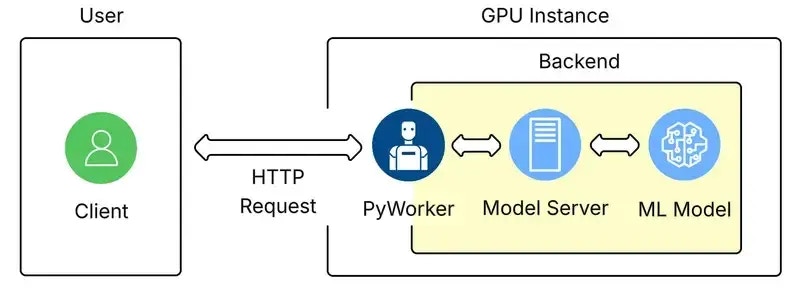 The term 'Backend' refers to the machine learning model itself, and the supplementary code used to make its inference work.
On Vast Serverless, the only way to access the ML model is through the PyWorker that wraps it. This allows the PyWorker to report accurate metrics to the serverless system so it can size the number of GPU instances appropriatley.
## Backend Configuration
Once a User has connected to a GPU Instance over Vast, the backend will start its own launch script. The launch script will:
* Setup a log file.
* Start a webserver to communicate with the ML model and PyWorker.
* Set environment variables.
* Launch the PyWorker and create a directory for it.
* Monitor the webserver and PyWorker processes.
After launch, the PyWorker acts as an inference API server façade, receiving HTTP requests, parsing them, and turning them into internal calls.
The 'Model Server' icon in the image above represents the inference runtime. This piece loads the model, exposes an interface, performs the model forward pass, and returns the resulting tensors to the PyWorker.
## Adding Endpoints
To add an endpoint to an existing backend, follow the instructions in the [PyWorker Extension Guide](/documentation/serverless/creating-new-pyworkers). This guide can also be used to write new backends.
## Authentication
The authentication information returned by [https://run.vast.ai/route/ ](/documentation/serverless/route)must be included in the request JSON to the PyWorker, but will be filtered out before forwarding to the model server. For example, a PyWorker expects to receive auth data in the request:
```json JSON icon="js" theme={null}
{
"auth_data": {
"signature": "a_base64_encoded_signature_string_from_route_endpoint",
"cost": 256,
"endpoint": "Your-Endpoint-Name",
"reqnum": 1234567890,
"url": "http://worker-ip-address:port",
"request_idx": 10203040
},
"payload": {
"inputs": "What is the answer to the universe?",
"parameters": {
"max_new_tokens": 256,
"temperature": 0.7,
"top_p": 0.9,
"do_sample": true
}
}
}
```
Once authenticated, the PyWorker will forward the following to the model server:
```json JSON icon="js" theme={null}
{
"inputs": "What is the answer to the universe?",
"parameters": {
"max_new_tokens": 256,
"temperature": 0.7,
"top_p": 0.9,
"do_sample": true
}
}
```
When the Serverless system returns an instance address from the `/route/` endpoint, it provides a unique signature with your request. The authentication server verifies this signature to ensure that only authorized clients can send requests to your server.
## More Information
For more detailed information and advanced configuration, visit the [Vast PyWorker repository](https://github.com/vast-ai/pyworker/).
Vast also has pre-made backends in our supported templates, which can be found in the Serverless section [here](https://cloud.vast.ai/templates/).
##
The term 'Backend' refers to the machine learning model itself, and the supplementary code used to make its inference work.
On Vast Serverless, the only way to access the ML model is through the PyWorker that wraps it. This allows the PyWorker to report accurate metrics to the serverless system so it can size the number of GPU instances appropriatley.
## Backend Configuration
Once a User has connected to a GPU Instance over Vast, the backend will start its own launch script. The launch script will:
* Setup a log file.
* Start a webserver to communicate with the ML model and PyWorker.
* Set environment variables.
* Launch the PyWorker and create a directory for it.
* Monitor the webserver and PyWorker processes.
After launch, the PyWorker acts as an inference API server façade, receiving HTTP requests, parsing them, and turning them into internal calls.
The 'Model Server' icon in the image above represents the inference runtime. This piece loads the model, exposes an interface, performs the model forward pass, and returns the resulting tensors to the PyWorker.
## Adding Endpoints
To add an endpoint to an existing backend, follow the instructions in the [PyWorker Extension Guide](/documentation/serverless/creating-new-pyworkers). This guide can also be used to write new backends.
## Authentication
The authentication information returned by [https://run.vast.ai/route/ ](/documentation/serverless/route)must be included in the request JSON to the PyWorker, but will be filtered out before forwarding to the model server. For example, a PyWorker expects to receive auth data in the request:
```json JSON icon="js" theme={null}
{
"auth_data": {
"signature": "a_base64_encoded_signature_string_from_route_endpoint",
"cost": 256,
"endpoint": "Your-Endpoint-Name",
"reqnum": 1234567890,
"url": "http://worker-ip-address:port",
"request_idx": 10203040
},
"payload": {
"inputs": "What is the answer to the universe?",
"parameters": {
"max_new_tokens": 256,
"temperature": 0.7,
"top_p": 0.9,
"do_sample": true
}
}
}
```
Once authenticated, the PyWorker will forward the following to the model server:
```json JSON icon="js" theme={null}
{
"inputs": "What is the answer to the universe?",
"parameters": {
"max_new_tokens": 256,
"temperature": 0.7,
"top_p": 0.9,
"do_sample": true
}
}
```
When the Serverless system returns an instance address from the `/route/` endpoint, it provides a unique signature with your request. The authentication server verifies this signature to ensure that only authorized clients can send requests to your server.
## More Information
For more detailed information and advanced configuration, visit the [Vast PyWorker repository](https://github.com/vast-ai/pyworker/).
Vast also has pre-made backends in our supported templates, which can be found in the Serverless section [here](https://cloud.vast.ai/templates/).
##